Triton源码编译与使用

一、源码编译

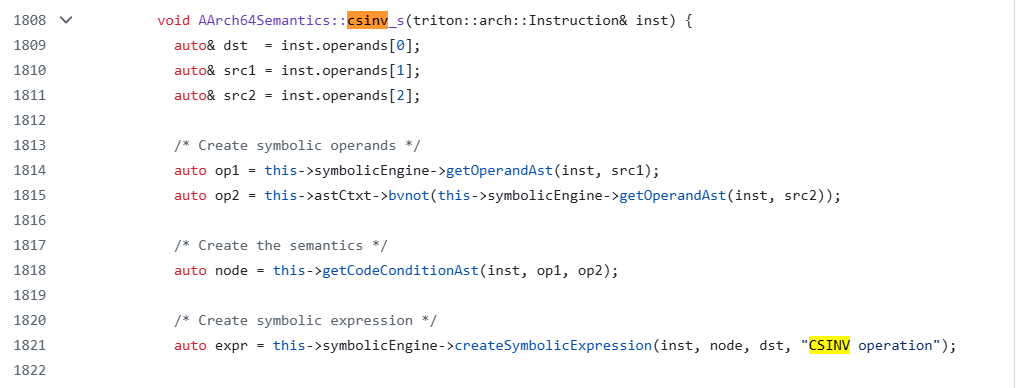
从pip下载的Triton版本比较老,有很多指令不支持,例如csinv。但是从最新源码来看,是支持该指令的

因此打算从源码编译新版本。

首先安装vcpkg

1
2
3
git clone https://github.com/microsoft/vcpkg.git
cd vcpkg
.\bootstrap-vcpkg.bat

下载Triton源码

1
git clone https://github.com/JonathanSalwan/Triton.git

进入Triton所在文件,执行以下指令

1
2
3
4
5
6
7
8
9
10
11
12
mkdir build
cd build

# 请修改下方 -DCMAKE_TOOLCHAIN_FILE 为你实际的 vcpkg 路径
cmake -A x64
-DPYTHON_BINDINGS=ON
-DCMAKE_TOOLCHAIN_FILE="C:/path/to/vcpkg/scripts/buildsystems/vcpkg.cmake"
# 如果有多个python环境,请指定目标python路径
-DPYTHON_EXECUTABLE="C:/path/to/your/python.exe"


cmake --build . --config Release --target install

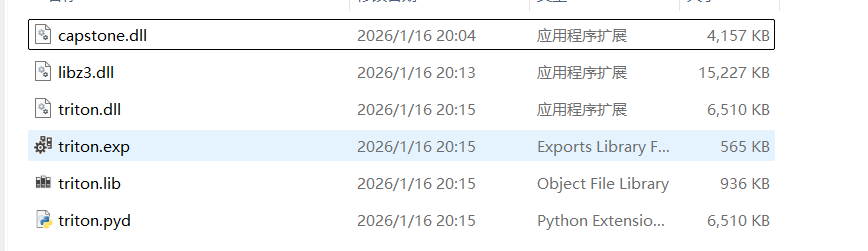
编译成功的产物在/build/src/libtriton/Release目录下

在目标python的\Lib\site-packages\目录下,创建triton文件夹,将以上文件拖过来,同时创建__init__.py,添加如下内容

1
2
# 1. 导入二进制扩展中的所有内容到包命名空间
from .triton import *

此内容借助AI生成,适用于python 3.7.9版本。如有不对,可借助AI修复。

最终目录结构如下

1
2
3
4
5
6
7
8
9
site-packages/
└── triton/
├── __init__.py
├── capstone.dll
├── libz3.dll
├── triton.dll
├── triton.exp
├── triton.lib
└── triton.pyd

二、基本用法

在使用Triton的过程中,我们经常使用到TritonContext、Instruction、operandWrapper(immediate、memoryAccess、register)这三个对象的方法。

Triton模拟执行框架

1
2
3
4
5
6
7
8
9
10
11
12
13
14
15
16
17
18
19
20
21
22
23
24
25
26
27
28
29
30
31
32
33
34
35
36
37
38
39
40
41
42
43
44
from triton import *

"""
[0907088b] 0x120a8624: "add x9, x24, x8, lsl #1" x24=0x122ca678 x8=0x29 => x9=0x122ca6ca
[2a058079] 0x120a8628: "ldrsh x10, [x9, #2]" x10=0x3434 x9=0x122ca6ca => x10=0x70
[29098079] 0x120a862c: "ldrsh x9, [x9, #4]" x9=0x122ca6ca => x9=0x0
[6a6a6af8] 0x120a8630: "ldr x10, [x19, x10]" x19=0x126fa000 x10=0x70 => x10=0xe4fff638
[6b6a69f8] 0x120a8634: "ldr x11, [x19, x9]" x19=0x126fa000 x9=0x0 => x11=0xe4fff670
[090d0011] 0x120a8638: "add w9, w8, #3" w8=0x29 => w9=0x2c
[6a0100f9] 0x120a863c: "str x10, [x11]" x10=0xe4fff638 x11=0xe4fff670 => x10=0xe4fff638
"""

function = {
0x120a8624: bytes.fromhex('0907088b'), # add x9, x24, x8, lsl #1
0x120a8628: bytes.fromhex('2a058079'), # ldrsh x10, [x9, #2]
0x120a862c: bytes.fromhex('29098079'), # ldrsh x9, [x9, #4]
0x120a8630: bytes.fromhex('6a6a6af8'), # ldr x10, [x19, x10]
0x120a8634: bytes.fromhex('6b6a69f8'), # ldr x11, [x19, x9]
0x120a8638: bytes.fromhex('090d0011'), # add w9, w8, #3
0x120a863c: bytes.fromhex('6a0100f9') # str x10, [x11]
}


if __name__ == '__main__':
# 创建指定架构的TritonContext
ctx = TritonContext(ARCH.AARCH64)
# 初始化相关寄存器
ctx.setConcreteRegisterValue(ctx.registers.x8, 0x29)
ctx.setConcreteRegisterValue(ctx.registers.x24, 0x122ca678)

# 初始化内存环境
ctx.setConcreteMemoryValue(MemoryAccess(0x122ca6cc, CPUSIZE.WORD), 0x7000)
ctx.setConcreteMemoryValue(MemoryAccess(0x126fa070, CPUSIZE.QWORD), 0xe4fff638)
ctx.setConcreteMemoryValue(MemoryAccess(0x122ca6cc, CPUSIZE.QWORD), 0xe4fff670)

# 模拟执行
pc = 0x120a8624
while pc in function:
# Build an instruction
inst = Instruction(pc, function[pc])
# Process the instruction
ctx.processing(inst)
print(inst.getDisassembly())
pc = ctx.getConcreteRegisterValue(ctx.registers.pc)

然而这仅是最基础的模拟执行框架,如果对于存在系统调用的模拟执行(一般是dump后模拟执行的情况),则需要手动实现系统调用并修复PLT表,例子可见src/examples/python/ctf-writeups/NorthSec-2018-MarsAnalytica/solve.py

operandWrapper

操作数可分为立即数、寄存器、内存,这三类操作数在Triton中都包装成了OperandWrapper。源码见/src/libtriton/arch/operandWrapper.cpp

1
2
3
4
5
6
7
8
9
10
11
12
OperandWrapper::OperandWrapper(const triton::arch::Immediate& imm) {
this->imm = imm;
this->type = triton::arch::OP_IMM;
}
OperandWrapper::OperandWrapper(const triton::arch::MemoryAccess& mem) {
this->mem = mem;
this->type = triton::arch::OP_MEM;
}
OperandWrapper::OperandWrapper(const triton::arch::Register& reg) {
this->reg = reg;
this->type = triton::arch::OP_REG;
}

对于这三类操作数,它们都有getType()方法,以及其他的运算符重载方法(例如==、!=)。其中getType()方法经常会使用到,以获取操作数的类型。以下示例是判断汇编指令中的寄存器类型并打印具体的值:

1
2
3
4
5
6
7
for op in inst.getOperands():
if op.getType() == OPERAND.MEM:
print(f"内存数: {op}, addr = {hex(op.getAddress())},value = {hex(ctx.getConcreteMemoryValue(op))}")
elif op.getType() == OPERAND.IMM:
print(f"立即数: {op.getValue()}")
elif op.getType() == OPERAND.REG:
print(f"寄存器: {op}, {hex(ctx.getConcreteRegisterValue(op))}")

立即数类型

源码见/src/libtriton/arch/immediate.cpp。常用方法如下(基本上有set、get方法配对):

1
2
imm.getValue()	# 获取立即数的值
imm.getSize() # 获取立即数的字节大小

内存数类型

源码见src/libtriton/arch/memoryAccess.cpp。常用方法如下(基本上有set、get方法配对):

1
2
3
4
5
6
7
8
9
mem.getAddress()	# 获取内存数的地址
mem.getSize() # 获取内存数的字节大小

mem.getLeaAst() # 获取内存地址的符号表达式
mem.getSegmentRegister() # 获取内存操作数的段寄存器
mem.getBaseRegister() # 获取内存操作数的基址寄存器
mem.getIndexRegister() # 获取内存操作数的索引寄存器
mem.getScale() # 获取内存操作数中索引寄存器的乘数
mem.getDisplacement() # 获取用于计算内存地址的常量值偏移值

使用示例如下:

1
2
3
4
5
6
7
8
9
10
11
12
13
14
15
16
17
18
19
20
21
22
23
24
25
26
27
28
29
30
31
32
33
34
# [0a7be878] 0x120a7eec: "ldrsh w10, [x24, x8, lsl #1]"
# w10=0x5bb6 x24=0x122ca678 x8=0x2
regs_before = {
'w10': 0x5bb6,
'x24': 0x122ca678,
'x8': 0x2
}
ctx = TritonContext(ARCH.AARCH64)
ctx.setAstRepresentationMode(AST_REPRESENTATION.PCODE) # AST展示风格改成伪代码风格
ins = Instruction(0x120a7eec, bytes.fromhex('0a7be878'))
for reg, value in regs_before.items():
ctx.setConcreteRegisterValue(getattr(ctx.registers, reg), value)
# 要想获取内存地址的符号表达式,需要事先符号化寄存器变量
ctx.symbolizeRegister(getattr(ctx.registers, reg))

ctx.processing(ins)

mem = ins.getOperands()[1]
print(f'指令: {ins.getDisassembly()}')
print(f'内存地址表达式: {mem.getLeaAst()}')
print(f'段寄存器: {mem.getSegmentRegister()}')
print(f'基址寄存器: {mem.getBaseRegister()}')
print(f'索引寄存器: {mem.getIndexRegister()}')
print(f'乘数: {mem.getScale()}')
print(f'常量偏移: {mem.getDisplacement()}')
"""
指令: ldrsh w10, [x24, x8, lsl #1]
内存地址表达式: ((x24_1 + ((x8_2 << 0x1) * 0x1)) + 0x0)
段寄存器: unknown:1 bv[0..0]
基址寄存器: x24:64 bv[63..0]
索引寄存器: x8:64 bv[63..0]
乘数: 0x1:64 bv[63..0]
常量偏移: 0x0:64 bv[63..0]
"""

寄存器类型

源码见src/libtriton/arch/register.cpp。常用方法如下:

1
2
3
reg.getId()		# 获取寄存器的id
reg.getSize() # 获取寄存器大小
reg.getName() # 获取寄存器名

Instruction

指令实现源码见src/libtriton/arch/instruction.cpp

指令构造

1
ins = Instruction(0x120a66c4, bytes.fromhex('e10301a9'))	# 指令地址, 机器码

在不执行ctx.processing()方法前,可调用的常见方法如下(基本上有set、get方法配对):

1
2
3
4
ins.getAddress()			# 获取指令地址
ins.getNextAddress() # 获取指令执行后的地址(下一个指令的地址)
ins.getOpcode() # 设置指令机器码
ins.getSize() # 获取指令大小

指令语义解析

以下指令在执行前,需要执行ctx.processing()以解析指令语义。常见方法如下:

1
2
3
4
5
6
7
8
9
10
11
12
13
14
15
16
17
18
19
20
21
22
ins.getDisassembly()			# 获取汇编指令
ins.getType() # 获取指令类型, 例如OPCODE.AARCH64.ADD

ins.setTaint() # 设置指令为污点指令
ins.isTainted() # 判断是否是污点指令

ins.isBranch() # 是否是分支指令(改变控制流的指令)
ins.isControlFlow() # 是否是控制流指令,与isBranch()区别在于其包括RET、SVC等

ins.isMemoryRead() # 指令是否从内存读取数据
ins.isMemoryWrite() # 指令是否将数据写入内存
ins.getLoadAccess() # 获取指令执行过程中读取的内存对象
ins.getStoreAccess() # 获取指令执行过程中写入的内存对象
ins.getReadRegisters() # 获取指令执行过程中读取的寄存器对象
ins.getWrittenRegisters() # 获取指令执行过程中写入的寄存器对象
ins.getReadImmediates() # 获取指令执行过程中读取的常量, 例如add w0, w1, #5中的立即数

ins.getCodeCondition() # 获取指令的执行条件, 例如csel w2, w19, w0, hi; b.ge等指令
ins.setCodeCondition() # 设置指令的执行条件
ins.isConditionTaken() # 是否满足指令的执行条件

ins.getSymbolicExpressions() # 获取该指令产生的符号表达式

示例

解析指令执行条件

1
2
3
4
5
6
7
8
9
10
11
12
13
14
15
16
17
18
# [6a020054] 0x120a7ef4: "b.ge #0x120a7f40"
regs_before = {
'n': 1, 'z': 0, 'c': 0, "v": 0
}
ctx = TritonContext(ARCH.AARCH64)
ins = Instruction(0x120a7ef4, bytes.fromhex('6a020054'))
for reg, value in regs_before.items():
ctx.setConcreteRegisterValue(getattr(ctx.registers, reg), value)
ctx.processing(ins)

print(ins.getDisassembly())
print(ins.getCodeCondition() == CONDITION.ARM.GE)
print(ins.isConditionTaken())
"""
b.ge #0x4c
True
False # 当v=1时为True
"""

解析指令的读内存对象

1
2
3
4
5
6
7
8
9
10
11
12
13
14
15
16
17
18
19
20
21
22
23
24
25
26
27
28
29
30
31
32
33
# [2a058079] 0x120a843c: "ldrsh x10, [x9, #2]" x10=0x684b x9=0x122ca6c4 => x10=0x18
regs_before = {
'x10': 0x684b,
'x9': 0x122ca6c4
}

ctx = TritonContext(ARCH.AARCH64)
ctx.setAstRepresentationMode(AST_REPRESENTATION.PCODE)

ins = Instruction(bytes.fromhex('2a058079'))
for reg, value in regs_before.items():
ctx.setConcreteRegisterValue(getattr(ctx.registers, reg), value)
ctx.setConcreteMemoryValue(0x122ca6c6, 0x18)

ctx.processing(ins)

if not ins.isMemoryRead():
print("The instruction is not load instruction")

loadAccess = ins.getLoadAccess()
print(loadAccess)

for mem, expr in loadAccess:
addr = mem.getAddress()
size = mem.getSize()
value = ctx.getConcreteMemoryAreaValue(addr, size)
print(f"memory address: {hex(addr)}, size: {hex(size)}, value: {value.hex()}")# Triton中值是小端显示
print(f"memory expression: {expr}")
"""
[([@0x122ca6c6]:16 bv[15..0], concat(0x0, 0x18))]
memory address: 0x122ca6c6, size: 0x2, value: 1800
memory expression: concat(0x0, 0x18)
"""

解析指令产生的符号表达式

1
2
3
4
5
6
7
8
9
10
11
12
13
14
15
16
17
18
19
20
21
22
23
24
25
26
27
28
29
30
31
32
33
34
35
36
37
38
39
40
41
42
43
44
45
46
47
48
49
50
51
52
53
54
55
56
57
58
59
60
61
62
63
64
65
66
67
68
69
70
71
72
73
74
75
76
77
78
79
from triton import *

"""
[0907088b] 0x120a8624: "add x9, x24, x8, lsl #1" x24=0x122ca678 x8=0x29 => x9=0x122ca6ca
[2a058079] 0x120a8628: "ldrsh x10, [x9, #2]" x10=0x3434 x9=0x122ca6ca => x10=0x70
[29098079] 0x120a862c: "ldrsh x9, [x9, #4]" x9=0x122ca6ca => x9=0x0
[6a6a6af8] 0x120a8630: "ldr x10, [x19, x10]" x19=0x126fa000 x10=0x70 => x10=0xe4fff638
[6b6a69f8] 0x120a8634: "ldr x11, [x19, x9]" x19=0x126fa000 x9=0x0 => x11=0xe4fff670
[090d0011] 0x120a8638: "add w9, w8, #3" w8=0x29 => w9=0x2c
[6a0100f9] 0x120a863c: "str x10, [x11]" x10=0xe4fff638 x11=0xe4fff670 => x10=0xe4fff638
"""

function = {
0x120a8624: bytes.fromhex('0907088b'), # add x9, x24, x8, lsl #1
0x120a8628: bytes.fromhex('2a058079'), # ldrsh x10, [x9, #2]
0x120a862c: bytes.fromhex('29098079'), # ldrsh x9, [x9, #4]
0x120a8630: bytes.fromhex('6a6a6af8'), # ldr x10, [x19, x10]
0x120a8634: bytes.fromhex('6b6a69f8'), # ldr x11, [x19, x9]
0x120a8638: bytes.fromhex('090d0011'), # add w9, w8, #3
0x120a863c: bytes.fromhex('6a0100f9') # str x10, [x11]
}


if __name__ == '__main__':

# 创建指定架构的TritonContext
ctx = TritonContext(ARCH.AARCH64)
# 设置AST展示模式
ctx.setAstRepresentationMode(AST_REPRESENTATION.PCODE)

# 初始化相关寄存器
ctx.setConcreteRegisterValue(ctx.registers.x8, 0x29)
ctx.setConcreteRegisterValue(ctx.registers.x24, 0x122ca678)

# 初始化内存环境
ctx.setConcreteMemoryValue(MemoryAccess(0x122ca6cc, CPUSIZE.WORD), 0x7000)
ctx.setConcreteMemoryValue(MemoryAccess(0x126fa070, CPUSIZE.QWORD), 0xe4fff638)
ctx.setConcreteMemoryValue(MemoryAccess(0x122ca6cc, CPUSIZE.QWORD), 0xe4fff670)

pc = 0x120a8624
while pc in function:
inst = Instruction(pc, function[pc])
ctx.processing(inst)

print(inst)
for expr in inst.getSymbolicExpressions():
print('\t', expr)
pc = ctx.getConcreteRegisterValue(ctx.registers.pc)
"""
0x120a8624: add x9, x24, x8, lsl #1
x9_0 = (0x122ca678 + (0x29 << 0x1)) ; ADD(S) operation
pc_1 = 0x120a8628 ; Program Counter
0x120a8628: ldrsh x10, [x9, #2]
x10_2 = sx(0x30, concat(0xf6, 0x70)) ; LDRSH operation - LOAD access
pc_3 = 0x120a862c ; Program Counter
0x120a862c: ldrsh x9, [x9, #4]
x9_4 = sx(0x30, concat(0xe4, 0xff)) ; LDRSH operation - LOAD access
pc_5 = 0x120a8630 ; Program Counter
0x120a8630: ldr x10, [x19, x10]
x10_6 = concat(0x0, 0x0, 0x0, 0x0, 0x0, 0x0, 0x0, 0x0) ; LDR operation - LOAD access
pc_7 = 0x120a8634 ; Program Counter
0x120a8634: ldr x11, [x19, x9]
x11_8 = concat(0x0, 0x0, 0x0, 0x0, 0x0, 0x0, 0x0, 0x0) ; LDR operation - LOAD access
pc_9 = 0x120a8638 ; Program Counter
0x120a8638: add w9, w8, #3
x9_10 = (0x29 + 0x3) ; ADD(S) operation
pc_11 = 0x120a863c ; Program Counter
0x120a863c: str x10, [x11]
@[0x7:8] = extract(63, 56, x10_6) ; Byte reference - STR operation - STORE access
@[0x6:8] = extract(55, 48, x10_6) ; Byte reference - STR operation - STORE access
@[0x5:8] = extract(47, 40, x10_6) ; Byte reference - STR operation - STORE access
@[0x4:8] = extract(39, 32, x10_6) ; Byte reference - STR operation - STORE access
@[0x3:8] = extract(31, 24, x10_6) ; Byte reference - STR operation - STORE access
@[0x2:8] = extract(23, 16, x10_6) ; Byte reference - STR operation - STORE access
@[0x1:8] = extract(15, 8, x10_6) ; Byte reference - STR operation - STORE access
@[0x0:8] = extract(7, 0, x10_6) ; Byte reference - STR operation - STORE access
@[0x0:64] = x10_6 ; Original memory access - STR operation - STORE access
pc_21 = 0x120a8640 ; Program Counter
"""

TritonContext

源码见src/libtriton/context/context.cpp

创建上下文

1
ctx = TritonContext(ARCH.AARCH64)# 架构为arm64

可支持的架构如下:

1
2
3
4
5
6
ARCH.AARCH64
ARCH.ARM32
ARCH.RV32
ARCH.RV64
ARCH.X86
ARCH.X86_64

汇编指令获取

1
ctx.disassembly(addr)	# 获取指定地址的汇编指令

指令模拟执行

1
ctx.processing(ins)		# 执行指令, 获取指令语义

模式设置

1
2
3
ctxc.setMode(mode, True/False)		# 设置mode状态
ctx.isModeEnabled(mode) # 判断mode是否开启
ctx.clearModes() # 关闭所有mode

其中可选的模式如下:

模式 状态 注释
MODE.ALIGNED_MEMORY 默认关闭 开启内存对齐, 简化内存建模
MODE.AST_OPTIMIZATION 默认关闭 开启AST表达式优化
MODE.CONCRETIZE_UNDEFINED_REGISTERS 默认开启 读取未初始化寄存器时,自动具体化为一个常量(通常是 0)
MODE.CONSTANT_FOLDING 默认关闭 开启常量折叠, 如果表达式的结果是常量则简化
MODE.MEMORY_ARRAY 默认关闭 使用 SMT Array 模型表示内存
MODE.ONLY_ON_SYMBOLIZED 默认关闭 只有当操作数是符号的,才进行符号语义传播
MODE.ONLY_ON_TAINTED 默认关闭 只有操作数被污点标记,才传播污点
MODE.PC_TRACKING_SYMBOLIC 默认关闭 允许程序计数器(PC)符号化, 有利于br寄存器跳转分析
MODE.SYMBOLIZE_INDEX_ROTATION 默认关闭 当索引是符号时,仍允许移位操作(ROL/ROR)
MODE.SYMBOLIZE_LOAD 默认关闭 允许 load 产生符号值
MODE.SYMBOLIZE_STORE 默认关闭 允许符号值写入内存
MODE.TAINT_THROUGH_POINTERS 默认关闭 允许污点通过指针间接传播

AST展示风格设置

1
2
ctx.setAstRepresentationMode(mode)	# 获取ast展示模式
ctx.getAstRepresentationMode() # 获取ast展示模式

可选的AST_REPRESENTATION有PYTHON、PCODE、SMT,这三种模式输出的表达式风格如下:

1
2
3
4
5
6
7
8
9
10
11
12
13
14
15
ctx.setAstRepresentationMode(AST_REPRESENTATION.PYTHON)	# 中缀表达式
"""
0x121cc440: "add x8, x8, #0x6d8" x8=0x122e7000 => x8=0x122e76d8
[ref_34 = ((0x122e7000 + 0x6d8) & 0xffffffffffffffff) # ADD(S) operation, ref_35 = 0x38 # Program Counter]
"""
ctx.setAstRepresentationMode(AST_REPRESENTATION.PCODE) # 人类更易懂的伪代码
"""
0x121cc440: "add x8, x8, #0x6d8" x8=0x122e7000 => x8=0x122e76d8
[x8_34 = (0x122e7000 + 0x6d8) ; ADD(S) operation, pc_35 = 0x38 ; Program Counter]
"""
ctx.setAstRepresentationMode(AST_REPRESENTATION.SMT) # Lisp 风格(前缀表达式)
"""
0x121cc440: "add x8, x8, #0x6d8" x8=0x122e7000 => x8=0x122e76d8
[(define-fun ref!34 () (_ BitVec 64) (bvadd (_ bv305033216 64) (_ bv1752 64))) ; ADD(S) operation, (define-fun ref!35 () (_ BitVec 64) (_ bv56 64)) ; Program Counter]
"""

寄存器值设置与获取

1
2
3
4
5
ctx.getRegister()			# 通过 id 或 name 获取寄存器对象
ctx.getAllRegisters() # 获取所有寄存器
ctx.getParentRegister(reg) # 获取指定寄存器的父寄存器, 例如 w0 -> x0
ctx.setConcreteRegisterValue(reg, value) # reg的格式如ctx.registers.x1
ctx.getConcreteRegisterValue(reg)

内存值设置与获取

1
2
3
4
5
6
7
8
9
# 内存值设置
ctx.setConcreteMemoryValue(addr, value) # 值的长度必须是 1byte
ctx.setConcreteMemoryValue(mem, value) # 支持byte word dword qword大小。mem是MemoryAccess对象, 例如MemoryAccess(0x105E018, CPUSIZE.QWORD)
ctx.setConcreteMemoryAreaValue(addr, value) # 超长内存区域的值设置
ctx.setConcreteMemoryAreaValue(addr, value, size)
# 内存值获取
ctx.getConcreteMemoryValue(addr)
ctx.getConcreteMemoryValue(mem)
ctx.getConcreteMemoryAreaValue(addr, size)

自定义回调事件

1
ctx.addCallback(type, callback)		# type 为回调事件, callback 为回调事件触发时执行的回调函数

Triton支持的回调事件类型如下:

1
2
3
4
5
CALLBACK.GET_CONCRETE_MEMORY_VALUE		# 从内存中读取具体值时触发回调函数
CALLBACK.GET_CONCRETE_REGISTER_VALUE # 从寄存器中读取具体值时触发回调函数
CALLBACK.SET_CONCRETE_MEMORY_VALUE # 修改内存值时触发回调函数
CALLBACK.SET_CONCRETE_REGISTER_VALUE # 修改寄存器值时触发回调函数
CALLBACK.SYMBOLIC_SIMPLIFICATION # 符号表达式优化时触发,主要用于优化和去混淆

以下是一个通过CALLBACK.SYMBOLIC_SIMPLIFICATION来处理MBAMixed Boolean-Arithmetic)混淆的例子(更多MBA去混淆案例见/src/examples/python/simplification.py)。

1
2
3
4
5
6
7
8
9
10
11
12
13
14
15
16
17
18
19
20
21
22
23
24
25
26
27
28
29
30
31
32
33
34
35
36
from triton import *


def xor_1(ctx, node):
# 在运算符是xor的情况下, 如果ast的两个节点是相同的变量, 则返回值为0的ast node
if node.getType() == AST_NODE.BVXOR:
if node.getChildren()[0].equalTo(node.getChildren()[1]):
print("simplify expr by user rules")
return ctx.getAstContext().bv(0, node.getBitvectorSize())
return node


if __name__ == '__main__':

ctx = TritonContext()
ctx.setArchitecture(ARCH.AARCH64)

ctx.setAstRepresentationMode(AST_REPRESENTATION.PCODE)

# 自定义简化规则
ctx.addCallback(CALLBACK.SYMBOLIC_SIMPLIFICATION, xor_1)

astCtxt = ctx.getAstContext()

# 创建ast node
a = astCtxt.bv(1, 8)

c = a ^ a
print('Expr: ', c)
c = ctx.simplify(c)
print('Simp: ', c)
"""
Expr: (0x1 ^ 0x1)
simplify expr by user rules
Simp: 0x0
"""

污点引擎

1
2
3
4
5
6
7
8
9
10
11
12
13
14
15
16
17
18
19
20
21
22
# 设置污点源
ctx.setTaint(oprand, True/False) # True表示设置操作数为污点, False反之
ctx.setTaintMemory(mem, True/False) # 设置目标内存为污点
ctx.setTaintRegister(reg, True/False) # 设置目标寄存器为污点
# 污点传播
ctx.taintMemory(addr)
ctx.taintMemory(mem)
ctx.taintRegister(reg)
ctx.taintUnion(dst, src) # 污点保留并合并, 传播规则:dst = isTainted(dst) | isTainted(src)
ctx.taintAssignment(dst, src) # 赋值污点传播,传播规则: dst = isTainted(dst)
# 取消污点
ctx.untaintMemory(addr)
ctx.untaintMemory(mem)
ctx.untaintRegister(reg)
# 污点获取
ctx.getTaintedMemory() # 获取污点内存
ctx.getTaintedRegisters() # 获取污点寄存器
# 污点判断
ctx.isTainted(oprand) # 判断操作数是否被污染
ctx.isMemoryTainted(addr, size) # 判断内存是否被污染
ctx.isMemoryTainted(mem)
ctx.isRegisterTainted(reg) # 判断寄存器是否被污染

以下是一个通过污点传播简化代码的例子。

1
2
3
4
5
6
7
8
9
10
11
12
13
14
15
16
17
18
19
20
21
22
23
24
25
26
27
28
29
30
31
32
33
34
35
36
37
38
39
40
41
42
43
44
45
46
47
48
49
50
51
52
53
54
55
56
57
58
59
60
61
62
from triton import *

"""
[0907088b] 0x120a8624: "add x9, x24, x8, lsl #1" x24=0x122ca678 x8=0x29 => x9=0x122ca6ca
[2a058079] 0x120a8628: "ldrsh x10, [x9, #2]" x10=0x3434 x9=0x122ca6ca => x10=0x70
[29098079] 0x120a862c: "ldrsh x9, [x9, #4]" x9=0x122ca6ca => x9=0x0
[6a6a6af8] 0x120a8630: "ldr x10, [x19, x10]" x19=0x126fa000 x10=0x70 => x10=0xe4fff638
[6b6a69f8] 0x120a8634: "ldr x11, [x19, x9]" x19=0x126fa000 x9=0x0 => x11=0xe4fff670
[090d0011] 0x120a8638: "add w9, w8, #3" w8=0x29 => w9=0x2c
[6a0100f9] 0x120a863c: "str x10, [x11]" x10=0xe4fff638 x11=0xe4fff670 => x10=0xe4fff638
"""

function = {
0x120a8624: bytes.fromhex('0907088b'), # add x9, x24, x8, lsl #1
0x120a8628: bytes.fromhex('2a058079'), # ldrsh x10, [x9, #2]
0x120a862c: bytes.fromhex('29098079'), # ldrsh x9, [x9, #4]
0x120a8630: bytes.fromhex('6a6a6af8'), # ldr x10, [x19, x10]
0x120a8634: bytes.fromhex('6b6a69f8'), # ldr x11, [x19, x9]
0x120a8638: bytes.fromhex('090d0011'), # add w9, w8, #3
0x120a863c: bytes.fromhex('6a0100f9') # str x10, [x11]
}


if __name__ == '__main__':
# 创建指定架构的TritonContext
ctx = TritonContext(ARCH.AARCH64)
# 开启污点指针间接传播
ctx.setMode(MODE.TAINT_THROUGH_POINTERS, True)
# 初始化相关寄存器
ctx.setConcreteRegisterValue(ctx.registers.x8, 0x29)
ctx.setConcreteRegisterValue(ctx.registers.x24, 0x122ca678)

# 初始化内存环境
ctx.setConcreteMemoryValue(MemoryAccess(0x122ca6cc, CPUSIZE.WORD), 0x7000)
ctx.setConcreteMemoryValue(MemoryAccess(0x126fa070, CPUSIZE.QWORD), 0xe4fff638)
ctx.setConcreteMemoryValue(MemoryAccess(0x122ca6cc, CPUSIZE.QWORD), 0xe4fff670)

# 设置初始污点源
ctx.taintRegister(ctx.registers.x8)

pc = 0x120a8624
while pc in function:
# Build an instruction
inst = Instruction(pc, function[pc])
# Process the instruction
ctx.processing(inst)
if inst.isTainted():
print('[tainted] %s' % (str(inst)))
pc = ctx.getConcreteRegisterValue(ctx.registers.pc)
"""允许污点通过指针间接传播
[tainted] 0x120a8624: add x9, x24, x8, lsl #1
[tainted] 0x120a8628: ldrsh x10, [x9, #2]
[tainted] 0x120a862c: ldrsh x9, [x9, #4]
[tainted] 0x120a8630: ldr x10, [x19, x10]
[tainted] 0x120a8634: ldr x11, [x19, x9]
[tainted] 0x120a8638: add w9, w8, #3
[tainted] 0x120a863c: str x10, [x11]
"""
"""不允许污点通过指针间接传播
[tainted] 0x120a8624: add x9, x24, x8, lsl #1
[tainted] 0x120a8638: add w9, w8, #3
"""

其他例子可见/src/examples/python/forward_tainting.py

符号引擎

基本方法

1
2
3
4
5
6
7
8
9
10
11
12
13
14
15
16
17
18
ctx.symbolizeMemory(mem, alias)		# 符号化内存对象, alias为可任取别名。返回值为SharedSymbolicVariable对象
ctx.symbolizeMemory(addr, size) # 将指定内存符号化,不返回符号化的对象
ctx.symbolizeRegister(reg, alias) # 符号化寄存器对象
ctx.getRegisterAst(oprand) # 获取寄存器的抽象语法树
ctx.getImmediateAst(imm) # 获取立即数的抽象语法树
ctx.getMemoryAst(mem) # 获取内存操作数的抽象语法树
ctx.getAstContext() # 获取抽象语法树
ctx.getSymbolicRegister(reg) # 获取寄存器的符号表达式
ctx.getSymbolicMemory(addr) # 获取内存的符号表达式

ctx.isMemorySymbolized(mem) # 是否符号化
ctx.isRegisterSymbolized(reg) # 是否符号化

ctx.concretizeAllMemory() # 去除所有内存地址对应的符号表达式
ctx.concretizeAllRegister() # 去除所有寄存器对应的符号表达式
ctx.concretizeMemory(mem) # 去除指定内存对应的符号表达式
ctx.concretizeMemory(addr) # 去除指定内存对应的符号表达式
ctx.concretizeRegister(reg) # 去除指定寄存器对应的符号表达式
1
2
3
4
5
6
7
8
9
10
ctx.newSymbolicExpression(ast_node, comment)	# 创建符号表达式
ctx.newSymbolicVariable(value, alias) # 创建符号变量
ctx.getConcreteVariableValue() # 获取符号变量的具体值
ctx.setConcreteVariableValue() # 设置符号变量的具体值

ctx.getSymbolicExpressions() # 获取ctx中的所有符号表达式
ctx.getSymbolicVariables() # 获取ctx中的所有符号变量
ctx.getSymbolicExpression(symExprId) # 获取符号表达式
ctx.getSymbolicVariable(symVarId) # 获取符号变量
ctx.getSymbolicVariable(symVarName)
1
2
ctx.simplify(ast_node)				# 简化符号表达式
ctx.simplify(block) # 简化基本块, 可用于死代码消除
1
2
3
4
ctx.getPathConstraints()		# 获取执行过程中的分支约束条件
ctx.getPathPredicate() # 获取执行到当前状态时必须满足的约束条件
ctx.pushPathConstraint(constraint) # 设置约束条件
ctx.clearPathConstraints() # 清除所有约束条件

求解器引擎

1
2
3
4
ctx.setSolver(solver)			# 设置求解器, 例如SOLVER.Z3
ctx.getSolver() # 获取求解器
ctx.getModels() # 获取求解结果
ctx.getModel()

例子

1
2
3
4
5
6
7
8
9
10
11
12
13
14
15
16
17
18
19
20
# 创建指定架构的TritonContext
ctx = TritonContext(ARCH.AARCH64)
# 设置AST展示模式
ctx.setAstRepresentationMode(AST_REPRESENTATION.PCODE)

# 初始化相关寄存器
ctx.setConcreteRegisterValue(ctx.registers.x8, 0x29)

# [0907088b] 0x120a8624: "add x9, x24, x8, lsl #1" x24=0x122ca678 x8=0x29 => x9=0x122ca6ca
inst = Instruction(0x120a8624, bytes.fromhex('0907088b'))
# 符号化待求解寄存器
x24 = ctx.symbolizeRegister(ctx.registers.x24, 'x24')
ctx.processing(inst)

x9Ast = ctx.getRegisterAst(ctx.registers.x9)
c = x9Ast == 0x122ca6ca
print('solve:', ctx.getModel(c)[0])
"""
solve: x24:64 = 0x122ca678
"""

常见示例

切片和优化(向后切片)

1
ctx.sliceExpressions(expr)	# 提取给定表达式所依赖的所有表达式

例子见src/examples/python/backward_slicing.py

死代码消除

1
2
ctx.simplify(ast_node, bool usingSolver, bool usingLLVM)
ctx.simplify(block, bool padding) # block为基本块,padding为True表示用nop指令填充死代码,false反之

例子可参考:src/examples/python/dead_store_elimination.pysrc/examples/python/simplification.py

不透明谓词检测

例子见src/examples/python/proving_opaque_predicates.py

布尔运算混淆简化

例子见src/examples/python/simplification.pysrc/examples/python/synthesizing_obfuscated_code.py,以及src/examples/python/synthesizing_obfuscated_expressions.py


参考:

https://deepwiki.com/JonathanSalwan/Triton/

https://github.com/JonathanSalwan/Triton/


Triton源码编译与使用
http://example.com/2026/01/18/Triton/Triton源码编译与使用/
作者
gla2xy
发布于
2026年1月18日
许可协议