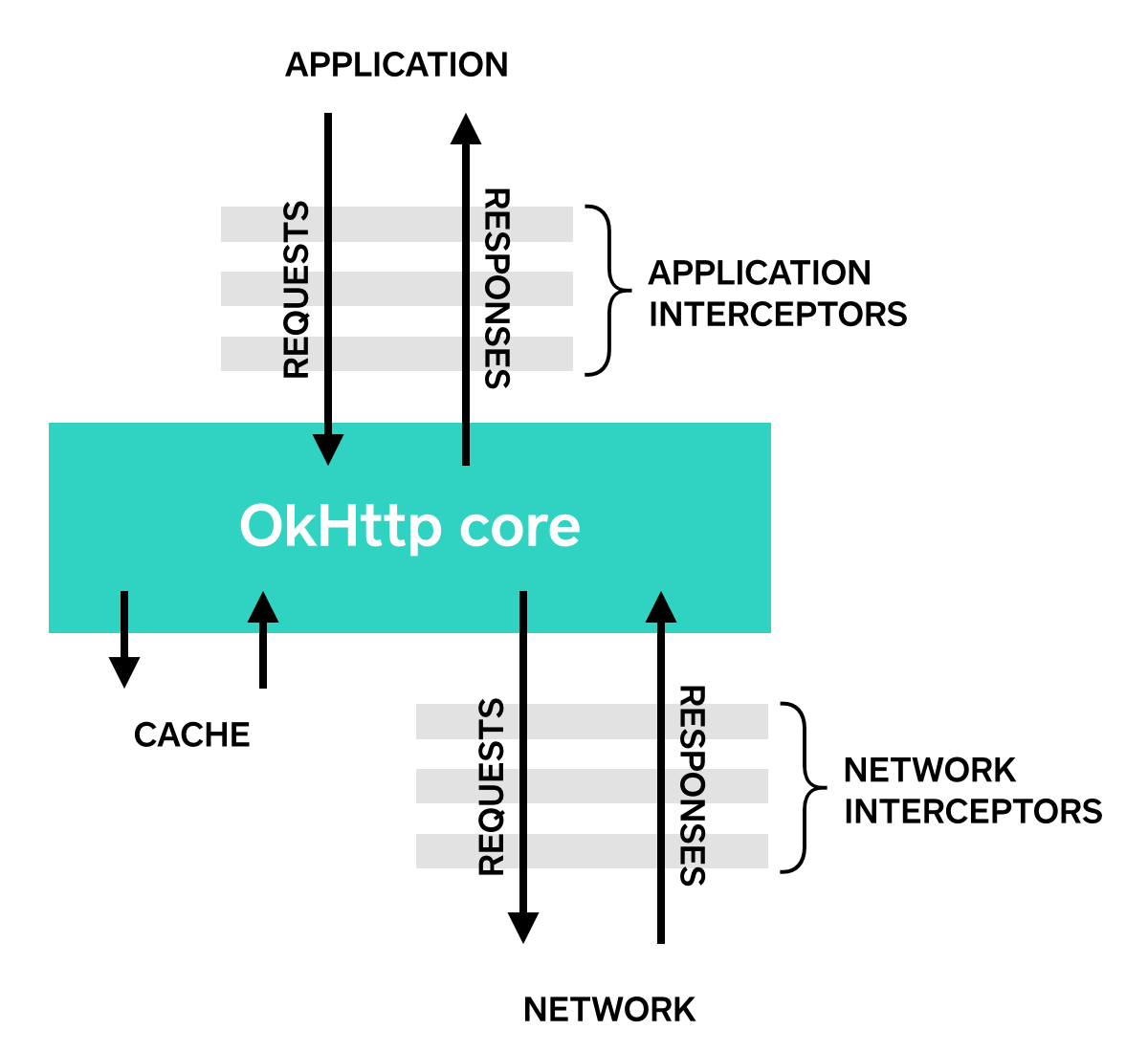
okhttp是什么 OkHttp 是一个默认高效的 HTTP 客户端:
HTTP/2 支持允许所有发送到同一主机的请求共享一个套接字(socket)。
连接池可以降低请求延迟(如果没有 HTTP/2 的话)。
透明的GZIP可以缩小下载大小。
响应缓存完全避免网络重复请求。
okhttp的使用 首先在Android项目中添加如下依赖包
1 implementation ("com.squareup.okhttp3:okhttp:3.14.9" )
使用 OkHttp 发送一个请求通常分为三步:
创建客户端 (OkHttpClient)
构建请求 (Request)
执行请求 (execute / enqueue)
同步请求 1 2 3 4 5 6 7 8 9 10 11 12 13 14 15 16 17 18 19 20 21 22 23 24 25 26 OkHttpClient client = new OkHttpClient ();run (String url) throws IOException {Request request = new Request .Builder()try (Response response = client.newCall(request).execute()) {return response.body().string();public static final MediaType JSON = MediaType.get("application/json; charset=utf-8" );OkHttpClient client = new OkHttpClient ();post (String url, String json) throws IOException {RequestBody body = RequestBody.create(json, JSON);Request request = new Request .Builder()try (Response response = client.newCall(request).execute()) {return response.body().string();
与get请求不同的是,post请求会将请求数据封装成json填入请求体中。
异步请求 1 2 3 4 5 6 7 8 9 10 11 12 13 14 15 16 17 18 19 20 21 22 private final OkHttpClient client = new OkHttpClient ();public void run () throws Exception {Request request = new Request .Builder()"http://publicobject.com/helloworld.txt" )new Callback () {@Override public void onFailure (Call call, IOException e) {@Override public void onResponse (Call call, Response response) throws IOException {if (response.isSuccessful()) {
同步请求使用的是execute()方法,而异步请求使用的是enqueue()方法。
okhttp的拦截器链 什么是拦截器 拦截器(Intercepetor)机制是okhttp的一大核心机制,可以对请求和响应进行监控和重写,以及请求重试呼叫。一个简单拦截器的实现如下
1 2 3 4 5 6 7 8 9 10 11 12 13 14 15 16 17 18 19 class LoggingInterceptor implements Interceptor {@Override public Response intercept (Interceptor.Chain chain) throws IOException {Request request = chain.request();long t1 = System.nanoTime();"Sending request %s on %s%n%s" ,Response response = chain.proceed(request);long t2 = System.nanoTime();"Received response for %s in %.1fms%n%s" ,1e6d , response.headers()));return response;
拦截器的种类与注册 okhttp中根据拦截器的注册方式不同,存在两种类型的拦截器:
应用拦截器 :通过addInterceptor()注册拦截器。只会被调用一次(即使之后发生了 HTTP 重定向或重试)。通常用于添加全局公共参数、打印最终的应用层日志等。网络拦截器 :通过addNetworkInterceptor()注册拦截器。够观察到所有网络传输细节。如果发生了重定向,网络拦截器会被调用多次。能看到压缩后的数据(Header 中包含 Accept-Encoding: gzip)。通常用于监控真实的网络流量(抓包)、处理 Cookie。
应用拦截器的注册
1 2 3 4 5 6 7 8 9 10 11 OkHttpClient client = new OkHttpClient .Builder()new LoggingInterceptor ())Request request = new Request .Builder()"http://www.publicobject.com/helloworld.txt" )"User-Agent" , "OkHttp Example" )Response response = client.newCall(request).execute();
网络拦截器的注册
1 2 3 4 5 6 7 8 9 10 11 OkHttpClient client = new OkHttpClient .Builder()new LoggingInterceptor ())Request request = new Request .Builder()"http://www.publicobject.com/helloworld.txt" )"User-Agent" , "OkHttp Example" )Response response = client.newCall(request).execute();
拦截器链的源码分析 从请求发起处出发
1 Response response = client.newCall(request).execute();
newCall()调用的是OkHttpClient
1 2 3 4 @Override public Call newCall (Request request) {return RealCall.newRealCall(this , request, false );
返回的是RealCall类型对象,所以execute()的具体代码逻辑在RealCall类中
1 2 3 4 5 6 7 8 9 10 11 12 13 14 15 @Override public Response execute () throws IOException {synchronized (this ) {if (executed) throw new IllegalStateException ("Already Executed" );true ;try {this );return getResponseWithInterceptorChain();finally {this );
将创建的Realcall实例加入到正在执行的异步请求队列 中。然后调用getResponseWithInterceptorChain()方法,该方法顾名思义,通过拦截链获取响应。代码如下:
1 2 3 4 5 6 7 8 9 10 11 12 13 14 15 16 17 18 19 20 21 22 23 24 25 26 27 28 29 30 31 32 33 34 35 36 37 38 39 Response getResponseWithInterceptorChain () throws IOException {new ArrayList <>();new RetryAndFollowUpInterceptor (client));new BridgeInterceptor (client.cookieJar()));new CacheInterceptor (client.internalCache()));new ConnectInterceptor (client));if (!forWebSocket) {new CallServerInterceptor (forWebSocket));Chain chain = new RealInterceptorChain (interceptors, transmitter, null , 0 ,this , client.connectTimeoutMillis(),boolean calledNoMoreExchanges = false ;try {Response response = chain.proceed(originalRequest);if (transmitter.isCanceled()) {throw new IOException ("Canceled" );return response;catch (IOException e) {true ;throw transmitter.noMoreExchanges(e);finally {if (!calledNoMoreExchanges) {null );
首先是构建拦截器数组,先添加用户自定义的应用拦截器,其次okhttp的核心拦截器,然后是用户自定义的网络拦截器,最后是执行网络请求的拦截器。然后通过RealInterceptorChain创建拦截链,并指定处理请求的下一个拦截器(index指定)。之后通过RealInterceptorChain类的proceed()方法获取响应结果。该方法如下
1 2 3 4 5 6 7 8 9 10 11 12 13 14 15 16 17 18 19 20 21 22 23 24 25 26 27 28 29 30 31 32 33 34 35 36 37 38 39 40 41 42 43 44 45 46 @Override public Response proceed (Request request) throws IOException {return proceed(request, transmitter, exchange);public Response proceed (Request request, Transmitter transmitter, @Nullable Exchange exchange) throws IOException {if (index >= interceptors.size()) throw new AssertionError ();if (this .exchange != null && !this .exchange.connection().supportsUrl(request.url())) {throw new IllegalStateException ("network interceptor " + interceptors.get(index - 1 )" must retain the same host and port" );if (this .exchange != null && calls > 1 ) {throw new IllegalStateException ("network interceptor " + interceptors.get(index - 1 )" must call proceed() exactly once" );RealInterceptorChain next = new RealInterceptorChain (interceptors, transmitter, exchange,1 , request, call, connectTimeout, readTimeout, writeTimeout);Interceptor interceptor = interceptors.get(index);Response response = interceptor.intercept(next);if (exchange != null && index + 1 < interceptors.size() && next.calls != 1 ) {throw new IllegalStateException ("network interceptor " + interceptor" must call proceed() exactly once" );if (response == null ) {throw new NullPointerException ("interceptor " + interceptor + " returned null" );if (response.body() == null ) {throw new IllegalStateException ("interceptor " + interceptor + " returned a response with no body" );return response;
主要代码逻辑为通过RealInterceptorChain创建拦截器链,并指定处理请求的下一个拦截器。然后获取当前拦截器,调用intercept方法处理请求。
由于拦截器都是实现自Interceptor接口类,并实现了intercept接口方法的具体代码逻辑,因此此处调用的intercept方法的具体代码逻辑需要视具体的拦截器而定。以我们自定义的LoggingInterceptor为例
1
2
3
4
5
6
7
8
9
10
11
12
13
14
15
16
17
18
19
class LoggingInterceptor implements Interceptor {@Override public Response intercept (Interceptor.Chain chain) throws IOException {Request request = chain.request();long t1 = System.nanoTime();"Sending request %s on %s%n%s" ,Response response = chain.proceed(request);long t2 = System.nanoTime();"Received response for %s in %.1fms%n%s" ,1e6d , response.headers()));return response;
由于参数chain是RealInterceptorChain实例,因此chain.proceed()方法调用的还是RealInterceptorChain类中的proceed方法。之后的流程就类似了。
hook okhttp 由于okhttp的特性,App一般只创建一个全局HttpClient实例进行复用。因此要想hook okhttp实现抓包,需要以spawn方式启动目标App。
先来来看看HttpClient的创建过程,寻找hook点
1 2 3 OkHttpClient client = new OkHttpClient .Builder()new LoggingInterceptor ())
首先创建Builder类,添加拦截器,最后调用Builder.build方法,
1 2 3 public OkHttpClient build () {return new OkHttpClient (this );
最终调用的是OkHttpClient的构造方法
1 2 3 4 5 6 OkHttpClient(Builder builder) {this .interceptors = Util.immutableList(builder.interceptors);this .networkInterceptors = Util.immutableList(builder.networkInterceptors);
把构造好的builder中的字段值挨个赋值给OkHttpClient的相应字段。
考虑到拦截器传递给OkHttpClient时调用了Util.immutableList()方法会将其变为一个只读List,因此通过hook OkHttpClient.Builder类的build()方法,将自定义的拦截器添加到build.interceptors字段。
在实际操作中需要注意:OkHttp 的 Response Body 是一个单向流(One-way Stream) ,只能被读取一次。如果要在响应阶段打印 Body 且不影响 App 运行,必须使用 source.peek() 或者先 clone() 一个 Buffer。
以下是js版实现的自定义拦截器
1 2 3 4 5 6 7 8 9 10 11 12 13 14 15 16 17 18 19 20 21 22 23 24 25 26 27 28 29 30 31 32 33 34 35 36 37 38 39 40 41 42 43 44 45 46 47 48 49 50 51 52 53 54 55 56 57 58 59 60 61 62 63 64 65 66 67 68 69 70 71 72 73 74 75 76 77 78 79 80 81 82 83 84 85 86 87 88 89 90 91 92 93 94 95 96 97 98 99 function hook_okhttp3 (Java .perform (function (var ByteString = Java .use ("com.android.okhttp.okio.ByteString" );var Buffer = Java .use ('okio.Buffer' ); var Interceptor = Java .use ("okhttp3.Interceptor" );var MyInterceptor = Java .registerClass ({name : "okhttp3.MyInterceptor" ,implements : [Interceptor ],methods : {intercept : function (chain ) {var request = chain.request ();try {console .log ("--> " + request.method () + " " + request.url ());console .log ("Headers:\n" + request.headers ());var requestBody = request.body ();var contentLength = requestBody ? requestBody.contentLength () : 0 ;if (contentLength > 0 ) {var buffer = Buffer .$new();writeTo (buffer);try {console .log ("\nrequest body String:\n" , buffer.readString (), "\n" );catch (error) {try {console .log ("\nrequest body ByteString:\n" , ByteString .of (buffer.readByteArray ()).hex (), "\n" );catch (error) {console .log ("error 1:" , error);catch (error) {console .log ("error 2:" , error);var response = chain.proceed (request);try {console .log ("<-- " + response.code () + " " + response.message () + " " + response.request ().url ());console .log ("Response Headers:\n" + response.headers ());var responseBody = response.body ();var contentLength = responseBody ? responseBody.contentLength () : 0 ;if (contentLength > 0 ) {var source = responseBody.source ();request (9223372036854775807 ); var buffer = source.buffer ();var cloneBuffer = buffer.clone ();var ContentType = response.headers ().get ("Content-Type" );console .log ("ContentType:" , ContentType );if (ContentType .indexOf ("video" ) == -1 ) {if (ContentType .indexOf ("application" ) == 0 ) {if (ContentType .indexOf ("application/zip" ) != 0 ) {try {console .log ("\nresponse.body StringClass\n" , cloneBuffer.readUtf8 (), "\n" );catch (error) {try {console .log ("\nresponse.body ByteString\n" , cloneBuffer.readByteString ().hex (), "\n" );catch (error) {console .log ("error 4:" , error);catch (error) {console .log ("error 3:" , error);return response;var myInterceptor = MyInterceptor .$new();var Builder = Java .use ("okhttp3.OkHttpClient$Builder" );console .log (Builder );Builder .build .implementation = function (this .interceptors ().add (myInterceptor);console .log ("[+] MyInterceptor added to OkHttpClient builder" );var result = this .build ();return result;console .log ("hook_okhttp3..." );hook_okhttp3 ()
更简便的方法是通过Java实现自定义拦截器,因为Frida提供了如下API用于将DEX加载进内存,从而使用DEX中的方法和类
1 Java .open ClassFile(dexPath ) .load() ;
okhttp新增了HttpLoggingInterceptor类,用于监控网络请求,详细代码见okhttp3/logging/HttpLoggingInterceptor ,稍作修改即可食用。对应的frida hook脚本如下:
1 2 3 4 5 6 7 8 9 10 11 12 13 14 function hook_okhttp3 (Java .perform (function (Java .openClassFile ("/data/local/tmp/okhttpLogging.dex" ).load ();var MyInterceptor = Java .use ("com.gal2xy.myokhttp.gal2xyLoggingInterceptor" );var myInterceptor = MyInterceptor .$new();var Builder = Java .use ("okhttp3.OkHttpClient$Builder" );Builder .build .implementation = function (this .networkInterceptors ().add (myInterceptor);return this .build ();console .log ("hook_okhttp3..." );
adb logcat -s gal2xyLoggingInterceptor查看网络日志。
然而!!!以上代码比较鸡肋,因为一旦okhttp方法名被混淆了,就起不了作用了,得去挨个找出方法名进行替换。不过github上有一个项目似乎实现了混淆okhttp库的frida拦截,详细见OkHttpLogger-Frida 。
参考:
Overview - OkHttp
Interceptors - OkHttp
okhttp 应用之 Interceptors 拦截器,「实践 + 原理」一样都不少前言 okhttp 是什么?一款封装 - 掘金
https://github.com/MirrorCitrus/divetrace/blob/master/dive-open-source/网络库:OkHttp3源码阅读.md
https://juejin.cn/post/7527863756283035699
https://github.com/CYRUS-STUDIO/frida-okhttp
https://github.com/siyujie/OkHttpLogger-Frida
https://github.com/square/okhttp/blob/parent-3.12.0/okhttp-logging-interceptor/src/main/java/okhttp3/logging/HttpLoggingInterceptor.java